Discover a feature that simplifies your teamwork: the shared library!
In Swello you can save your media directly (photos, videos and GIFs) along with your texts to share them with the rest of your team. All your content stays available and can be reached straight from the scheduling area, whenever you need it.
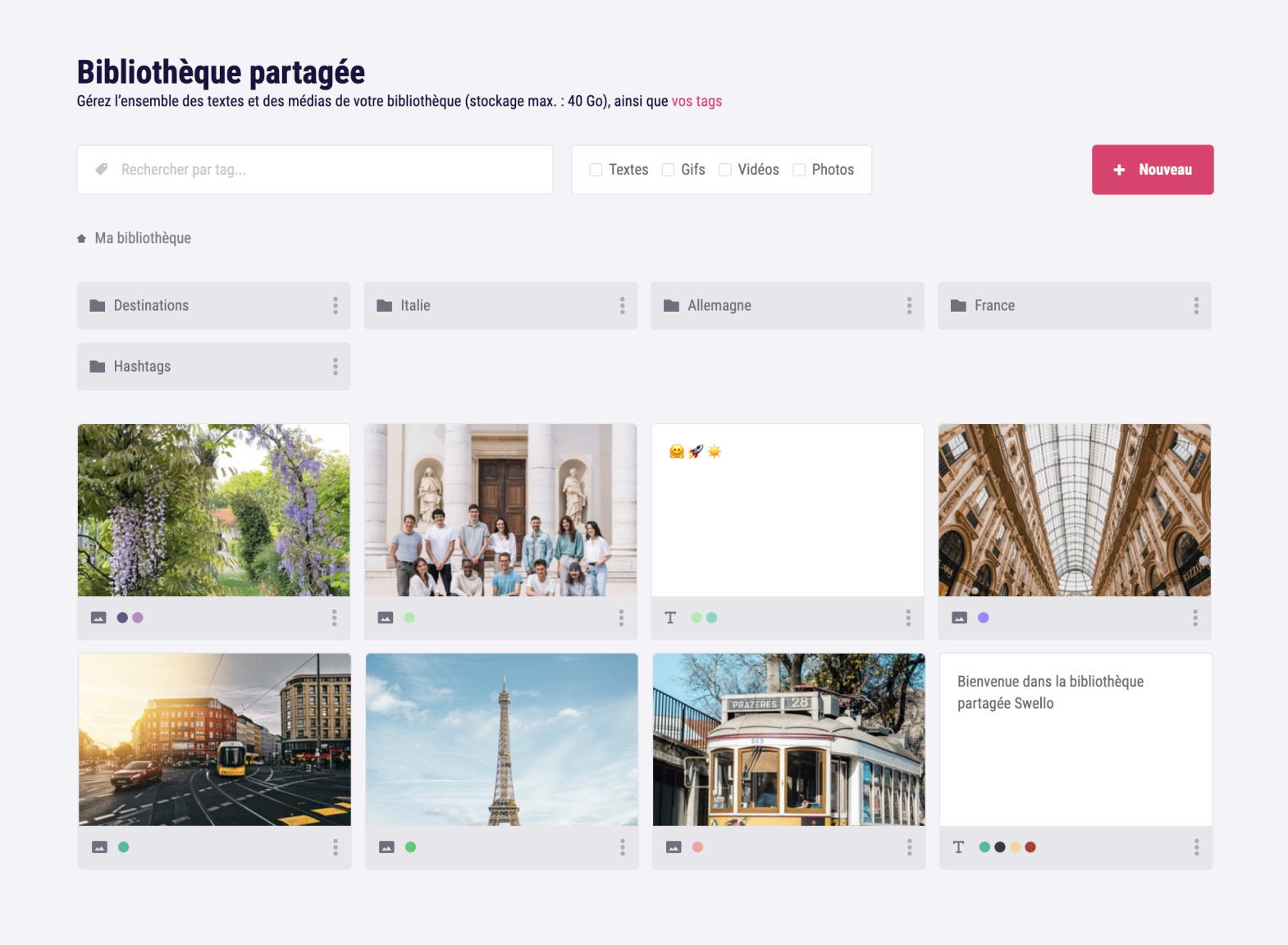
Multiple file selection
- Pick one or several media items using shortcuts
Full navigation
- Drag and drop your media smoothly into folders
- Create folders
- Browse your folders using a breadcrumb trail
- Select items with a right click to reach the file settings
Permission management
This feature is only available to users who belong to a team or a sub-team. Feel free to get in touch with our support team if you need to.
- Appoint people from your team or your sub-teams as "Editor" or "Reader" for selected folders only
- Manage item permissions straight from the file settings.
To do so, you can import content from your computer or directly from Swello Pixel, our image editor.
One more thing: our content library offers a tag system to sort all your content and find it again more easily.
 Scheduling
Schedule your posts on your social networks
Scheduling
Schedule your posts on your social networks
 Team management
Collaborate with your team
Team management
Collaborate with your team
 Monitoring Dashboard
Stay informed about news in your industry
Monitoring Dashboard
Stay informed about news in your industry
 Inbox
Manage all your comments
Inbox
Manage all your comments